
Aligna
Adopting a design system means dragging an existing codebase onto it: hundreds of colors and spacings that were typed in by hand and should be tokens. Aligna reads your tokens, finds every raw value in the code that matches one, and proposes the swap. You confirm, it writes the change as a reviewable diff.
- Role
- Lead Product Designer & Prototyper
- Type
- Personal Concept
- Status
- In Design
- Form Factor
- Web App · Figma + Repo Connect
The cost of doing it by hand
The value here is not a monthly saving, it is episodic. A team hits this once when they adopt a system, again at a rebrand, again after an acquisition. But in that moment the manual job is large, slow, and easy to get wrong.
These describe the shape of the value, not measured outcomes. Aligna is a concept in design. Real numbers replace these only once it runs on a real migration.
The cleanup before the pipeline
Aligna is built for one specific moment: the day a team commits to a design system but still has a codebase full of hardcoded values. It reads the tokens you have already defined, scans the code for raw values that match them, and proposes turning each one into the proper token. You review the list and confirm. It writes the change.
Mature teams stop drift with a pipeline, a single source of truth that generates both Figma and code so the two can never disagree. Aligna does not compete with that. It is the step before it: the one-time job of pulling a messy, pre-token codebase up to the system, so the pipeline has something clean to maintain. The design system is the answer key. The code is what gets graded against it.
Adopting a system means a thousand manual swaps
A team builds a clean design system in Figma. Then comes the real work: an existing app where colors and spacings were typed in by hand, long before the system existed. Every raw hex buried in the CSS is supposed to become a named token. Nobody knows where they all are.
- The values are scattered. Raw hex and off-grid pixels live across hundreds of files, inline styles, and one-off overrides. A blind find-and-replace misses most of them.
- The mapping is ambiguous. The same 16px might be spacing in one place and font size in another. There is no safe global swap, so every match needs a human eye.
Done by hand, this is exactly as tedious as it sounds. The work loops value by value, with no way to know when it is actually finished:
- Grep for a value
- Guess its token
- Replace by hand
- Miss half of them
Two things make the manual version worse. The same raw value carries different meanings in different places, so there is no safe automatic replace. And there is no inventory: when a value matches no token, it is unclear whether to leave it or define a new one.
The hard part is the level, not the match
Matching a raw value to a token is trivial. Does this #3B82F6 equal the token's value? Exact, deterministic, done. The hard part is that the same value can belong to several tokens, because a real token system is a hierarchy.
The signal that saves it is already in the code: the CSS property. A value in background wants a background token, a value in color wants a text token, a value in border wants a border token. The role is written right next to the value, so reading it is a lookup, not a guess.
So Aligna does not pick one token and apply it. It value-matches to narrow the candidates, reads the property to rank them, and sorts every occurrence into one of three tiers.
- Auto - The role is clearThe property names the role, so the most specific matching token is pre-filled. You confirm a whole group in a glance.
- Decide - Two tokens fit the same roleThe value collides and the property cannot break the tie. Shown as a choice, the level is yours to pick. Never applied without a click.
- Leave raw - No token, or no roleThe value matches nothing, or sits in an inline blob with no property to read. Aligna does not guess. It stays raw until you decide.
How the level is decided
Four steps, deterministic first. The human only ever sees what the rules could not settle, which keeps judgment on the decisions that need it and nowhere else.
- Value match.Normalize and compare, so #3B82F6 equals rgb(59,130,246) and 1rem equals 16px. Returns the chain of tokens that share this value. Deterministic.
- Role from property.background, color, border, fill map to the token's role. Reading the property is a lookup, not a model call. Deterministic.
- Prefer specific, demote primitive.The most specific token whose role fits wins. The raw primitive is the last resort, never the default, because pointing at it throws away theming.
- Human on ties.Anything still ambiguous, or matching no token, waits for a click. Nothing is auto-applied on a guess.
Scaling to a real repo
The token set comes from a plugin export, a few hundred names and values in one JSON, on any Figma plan with no Enterprise gate. The code can be 500,000 lines, but Aligna never feeds it to a model. It reads source, not the build, and a plain text search finds every raw value fast.
repo  ~500k LOC
   │   ripgrep style + component files  (deterministic, ms)
   ▼
raw values found   ~200, with file + property
tokens.json        ~300 names + values
   │   value match + role  (clears most for free)
   ▼
the ambiguous few  all the human ever sees
Repo size only touches the search step, which runs in milliseconds. The blast radius for a swap, every place a value is used, is a plain text result rather than a traversal: ripgrep returns the exact lines, and only those lines change.
The unit of work is never the whole codebase. It is the list of distinct raw values, a few hundred at most, each with its context. A huge repo and a tidy one produce a similar-sized list, because the list is bounded by how many colors and sizes a design uses, not by how many files it spans.
And the scan is scoped to the change, not the world. It reads only the files in your active branch or staging diff, so a monolith's years of legacy debt stay frozen and unflagged until you ask for a full audit. The first run never buries you.
What about a linter?
A token-aware linter (stylelint-declaration-strict-value, the eslint design-token plugins) already flags raw values and can autofix the obvious ones, and it runs in CI forever. For keeping a clean codebase clean, that is the right tool, and Aligna does not compete with it.
The linter is built for the steady state, not the migration. It autofixes only the unambiguous cases, it assumes the value already matches a token exactly, and it gives you no review surface for the ambiguous bulk. The first sweep onto a system is the opposite situation: hundreds of values at once, many of them near-misses (a hand-typed #3C82F7 against a #3B82F6 token, which an exact compare never catches), every one needing a human glance.
So the wedge was never the value-match, that part is commodity. It is the single review pass over the ambiguous bulk: a few hundred near-miss and multi-token decisions, sorted, role-ranked, and confirmable in a glance, with a clean diff at the end. A linter cannot give you that surface, and a senior dev with sed gives up halfway. That one pass is the whole job, done once, safely.
Worth it only when the design will change
Tokenizing is not about tidy code. Today the swap is invisible, the same pixels before and after. The payoff is the next time something changes, so the value is really a bet on future change.
- Hardcoded · Frozen. A raw #3B82F6 can never respond to anything. Dark mode, a rebrand, a white-label client: each one becomes a manual hunt across the codebase, and you always miss some. The cost lands later: at the next restyle, all at once.
tokenize once →
- Tokenized · Moves together. A var(--color-primary) follows its token. Change the token once and every use updates. Dark mode and rebrands become a theme swap, not a sweep. It pays off: the next time anything changes.
So the honest qualifier is built in. A product that will never theme, rebrand, or spin up a second brand does not need this, and Aligna will not pretend otherwise. It earns its place exactly when a restyle is coming, which is also when the manual version hurts most.
What ships first, what ships next, what never ships
Scope is cut to the safe core: read, assign, and write values, with a human on every swap and nothing permanent until you commit. Everything else is sequenced, or explicitly killed.
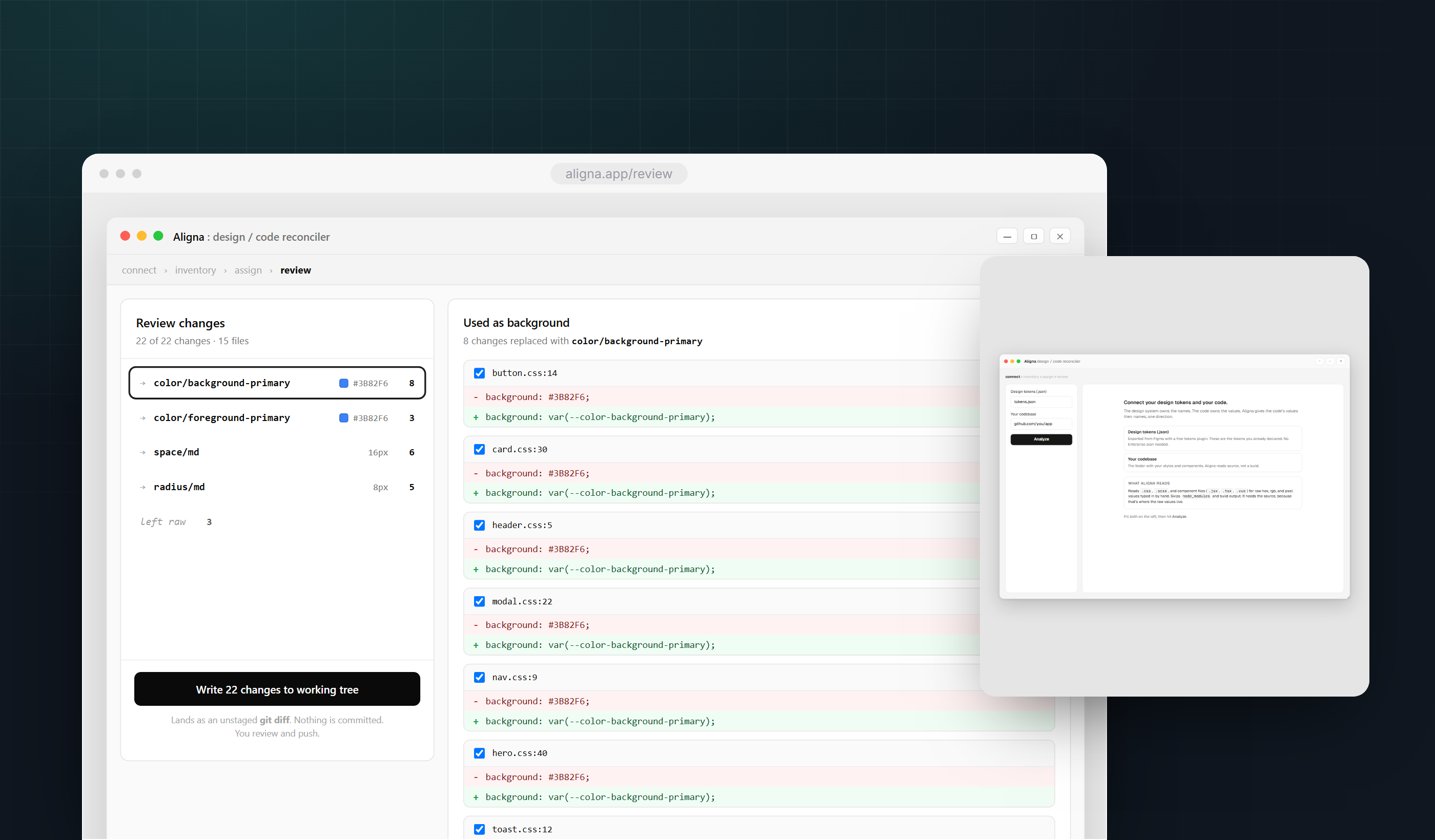
- V1 · Now - Inventory, assign, reviewScan a local repo for raw values, assign each to a token by role, write the confirmed swaps to the working tree as a reversible diff. No credentials, no commit. You review with git and commit yourself.
- V2 · Next - Stay-clean gate, optional PRGenerate a lint rule and CI check, tuned to your tokens, so raw values cannot creep back. Plus an opt-in GitHub connection that opens the swap as a pull request instead of a local diff.
- Never - Guessing intentAuto-assigning a token with no human in the loop, or rewriting component markup. Aligna pre-fills and proposes, it never applies a swap it is unsure of, and it never edits structure.
Assign meaning, by role
The inventory finds the nameless values. Assign gives them names. The screen takes one raw value and splits it by how the code uses it: the background uses on one row, the text uses on another, each with the right token already filled in from the property. You are not deciding from scratch, you are confirming a pre-filled answer.
Every occurrence is a checkbox, all on by default, because they matched on value and role. When one of them is a coincidence, the same blue that happens to sit in a chart, you uncheck it and it stays raw. Nothing is swapped in bulk without a way to opt a single line out. The count follows your selection, so a wrong-looking one is a single click away from excluded.
The values with no clear role, or no matching token, are pulled into their own bucket rather than guessed. There the choice is honest and small: define a new token for it, which is additive, or leave it raw. A value Aligna cannot place is a finding, not something to force.
Apply, review, undo
Confirmed swaps are written into the working tree, not committed. Every raw value you approved becomes a token reference, and the whole change lands as a single git diff. You read it before anything is permanent, the same overview that kept the AI from breaking things, now showing every line it touched.
- Apply · git - The diff is the review and the undoSwaps land as an unstaged change. git diff shows before and after, and discarding a line is the undo. Nothing is committed until you say so, so you can move fast because nothing is permanent.
- Stay clean · lint - A lock on the doorA one-time cleanup drifts back in a week. Because Aligna already learned your value-to-token map, it generates a lint rule and a CI check, tuned to your tokens, that fail a build when a raw value reappears.
Two things the naive version gets wrong. A token often has a dark-mode twin, so the reference has to carry both, not freeze one. And Figma stores sRGB hex while modern shadcn stores oklch, so matching a value is a color-space comparison, not a string match.
Why the screens are shaped this way
The product makes a bulk, AI-assisted change to a codebase, so the real usability risk is not a mis-click. It is a hundred silent wrong edits a tired person rubber-stamps. Every screen choice is calibrated to that one risk: automate the certain, add friction on the uncertain, and make the whole run cheap to undo.
- Split by risk, not by step. The deterministic bulk (a value that exactly equals a token) is batched and pre-confirmed. The uncertain few (a near-miss, a value that fits two tokens) are pulled out and slowed down. Low-risk work runs quietly, high-risk work earns deliberate friction.
- Pre-fill the likely answer, dim the wrong one. The recommended token is selected by default and the primitive is greyed and marked avoid. A correct default you can override beats an empty field you must fill. Recognition, not recall.
- Chunk by role. Two hundred occurrences collapse into three or four role groups, because working memory holds a handful of things, not hundreds. The CSS property does the chunking, so you confirm a group instead of judging each line.
- Default the set on, opt out one. The checklist starts fully selected and lets you uncheck the odd coincidence. Fast on the happy path, safe on the exception, never all-or-nothing.
- Route the eye with contrast. Review dims what did not change and tints the delta red and green, so attention lands on the edit without reading every line. Luminance hierarchy for auditing a machine's work.
- Delete the decision that should not exist. Tokens are truth and code conforms, so there is no which-side-wins toggle. The simplest control is the one you remove.
- Make every action reversible. The run ends in an unstaged git diff, an artifact engineers already trust. Because nothing commits, the cost of a wrong call drops to near zero, which is what lets a careful person move fast.
None of these are exotic heuristics. They are cognitive load, smart defaults, contrast hierarchy, and reversible actions doing their ordinary jobs. What is different is the stakes: on an AI-in-the-loop surface the failure mode is not friction, it is a confident wrong edit at scale, so the layout is tuned to put the human's attention exactly where the machine is least sure.
The decisions that shaped the surface area
- Value, not name. Aligna matches by value, normalized so #3B82F6 equals rgb(59,130,246), because Figma names and code names never line up. The naming gap is the thing it bridges, not an assumption it leans on, which is what makes it work on a real, messy repo.
- Tokens, not components. The unit of work is a value-to-token swap, never component identity. That is smaller, deterministic, and buildable today. Recognizing that a div is your Button waits on a model you can trust without re-checking, so it stays parked, not pretended.
- Role is read, level is judged. The CSS property gives the role by lookup, no guessing. Only the token level, and only when it is genuinely ambiguous, asks for a human. Automation on the certain part, attention on the uncertain part, and nothing applied on a guess.
- Local and reversible, not connected and committed. It works on a local working tree, writes changes unstaged, and asks for no credentials and no repo access. git diff is the review and the undo at once. You move fast because nothing is permanent until you commit.
- A vitamin unless you will restyle. The payoff is future change: dark mode, a rebrand, a second brand. A product that will never restyle does not need this, and the tool says so rather than manufacturing urgency. Honest scope is part of the design.
- Reliable where the property is adjacent. Reading the role from the CSS property is clean in CSS and SCSS, and degrades where the value is not statically next to its property: Tailwind arbitrary values, CSS-in-JS, shorthand declarations. v1 scopes to where the signal holds and treats the rest as Leave-raw. CSS-in-JS is a later pass, not a day-one claim.